tl;dr: Run bunx describetime 2026-10-16T15:41:41-04:00 to see a date described in different ways.
Example output:
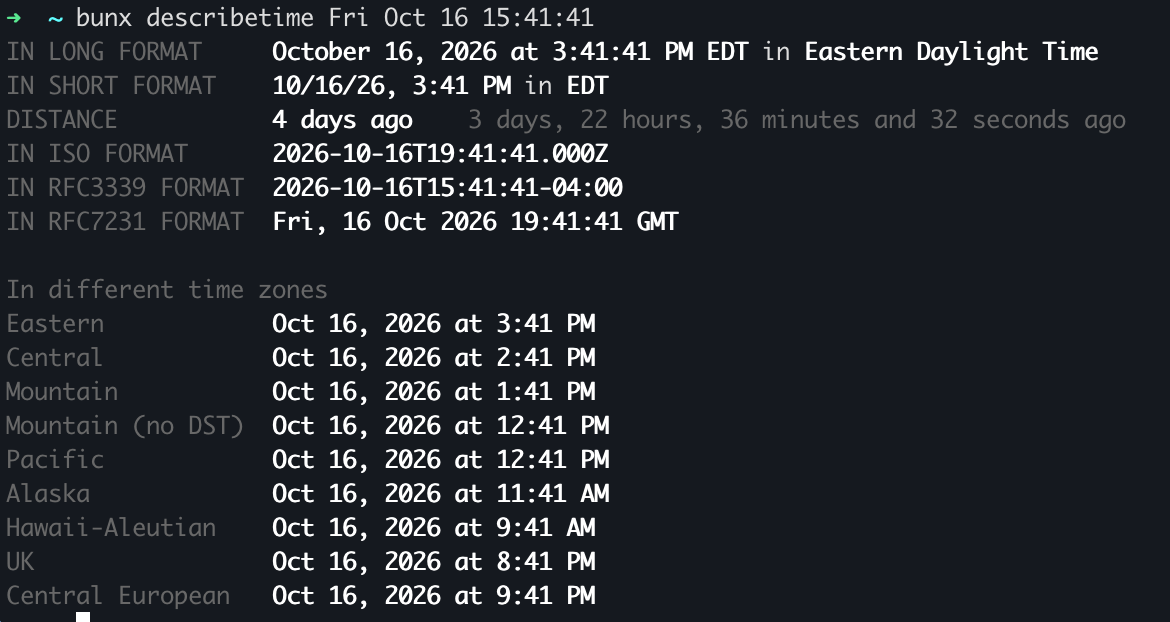
The purpose of this tool is to help you understand a date-time you might come across. For example, how does 2026-10-22T01:28:43.000Z compare to October 21, 2026 at 9:28:43 PM EDT? (Hint: they're the same moment in time.)
Another advantage of this tool is its ability to describe a date-time in words relative to right now. As you can see in the picture, it says 4 days ago, but it also, if it helps you, says it "more accurately" as 3 days, 22 hours, 36 minutes and 32 seconds ago.
Lastly, it prints the date-time in a bunch of different time zones. Hopefully, that can help you quickly work out the time zone arithmetic.
About the CLI itself
The code for it is here: https://github.com/peterbe/describetime
It's written in TypeScript and uses Bun as the runtime. Every release is published to npmjs.com, but it is also compiled as a native binary, which you can download here. For example, if you're on Linux, you can download describetime-linux-arm64 as a single binary file and rename it to ~/bin/describetime, and then you won't need to use bunx to download and run it.