Fastest database for Tornado
October 9, 2013
9 comments Python, Tornado
When you use a web framework like Tornado, which is single threaded with an event loop (like nodejs familiar with that), and you need persistency (ie. a database) there is one important questions you need to ask yourself:
Is the query fast enough that I don't need to do it asynchronously?
If it's going to be a really fast query (for example, selecting a small recordset by key (which is indexed)) it'll be quicker to just do it in a blocking fashion. It means less CPU work to jump between the events.
However, if the query is going to be potentially slow (like a complex and data intensive report) it's better to execute the query asynchronously, do something else and continue once the database gets back a result. If you don't all other requests to your web server might time out.
Another important question whenever you work with a database is:
Would it be a disaster if you intend to store something that ends up not getting stored on disk?
This question is related to the D in ACID and doesn't have anything specific to do with Tornado. However, the reason you're using Tornado is probably because it's much more performant that more convenient alternatives like Django. So, if performance is so important, is durable writes important too?
Let's cut to the chase... I wanted to see how different databases perform when integrating them in Tornado. But let's not just look at different databases, let's also evaluate different ways of using them; either blocking or non-blocking.
What the benchmark does is:
- On one single Python process...
- For each database engine...
- Create X records of something containing a string, a datetime, a list and a floating point number...
- Edit each of these records which will require a fetch and an update...
- Delete each of these records...
I can vary the number of records ("X") and sum the total wall clock time it takes for each database engine to complete all of these tasks. That way you get an insert, a select, an update and a delete. Realistically, it's likely you'll get a lot more selects than any of the other operations.
And the winner is:
pymongo!! Using the blocking version without doing safe writes.
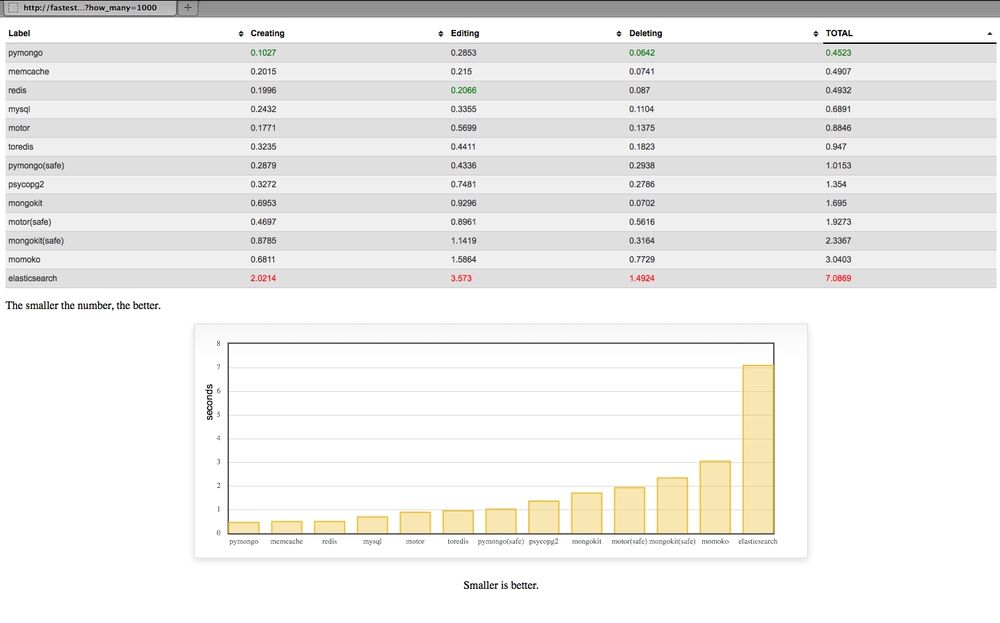
Let me explain some of those engines
- pymongo is the blocking pure python engine
- with the redis, toredis and memcache a document ID is generated with
uuid4, converted to JSON and stored as a key - toredis is a redis wrapper for Tornado
- when it says
(safe)on the engine it means to tell MongoDB to not respond until it has with some confidence written the data - motor is an asynchronous MongoDB driver specifically for Tornado
- MySQL doesn't support arrays (unlike PostgreSQL) so instead the
tagsfield is stored astextand transformed back and fro as JSON - None of these database have been tuned for performance. They're all fresh out-of-the-box installs on OSX with homebrew
- None of these database have indexes apart from ElasticSearch where all things are indexes
- momoko is an awesome wrapper for psycopg2 which works asyncronously specifically with Tornado
- memcache is not persistant but I wanted to include it as a reference
- All JSON encoding and decoding is done using ultrajson which should work to memcache, redis, toredis and mysql's advantage.
- mongokit is a thin wrapper on pymongo that makes it feel more like an ORM
- A lot of these can be optimized by doing bulk operations but I don't think that's fair
- I don't yet have a way of measuring memory usage for each driver+engine but that's not really what this blog post is about
- I'd love to do more work on running these benchmarks on concurrent hits to the server. However, with blocking drivers what would happen is that each request (other than the first one) would have to sit there and wait so the user experience would be poor but it wouldn't be any faster in total time.
- I use the official elasticsearch driver but am curious to also add Tornado-es some day which will do asynchronous HTTP calls over to ES.
You can run the benchmark yourself
The code is here on github. The following steps should work:
$ virtualenv fastestdb
$ source fastestdb/bin/activate
$ git clone https://github.com/peterbe/fastestdb.git
$ cd fastestdb
$ pip install -r requirements.txt
$ python tornado_app.py
Then fire up http://localhost:8000/benchmark?how_many=10 and see if you can get it running.
Note: You might need to mess around with some of the hardcoded connection details in the file tornado_app.py.
Discussion
Before the lynch mob of HackerNews kill me for saying something positive about MongoDB; I'm perfectly aware of the discussions about large datasets and the complexities of managing them. Any flametroll comments about "web scale" will be deleted.
I think MongoDB does a really good job here. It's faster than Redis and Memcache but unlike those key-value stores, with MongoDB you can, if you need to, do actual queries (e.g. select all talks where the duration is greater than 0.5). MongoDB does its serialization between python and the database using a binary wrapper called BSON but mind you, the Redis and Memcache drivers also go to use a binary JSON encoding/decoder.
The conclusion is; be aware what you want to do with your data and what and where performance versus durability matters.
What's next
Some of those drivers will work on PyPy which I'm looking forward to testing. It should work with cffi like psycopg2cffi for example for PostgreSQL.
Also, an asynchronous version of elasticsearch should be interesting.
UPDATE 1
Today I installed RethinkDB 2.0 and included it in the test.
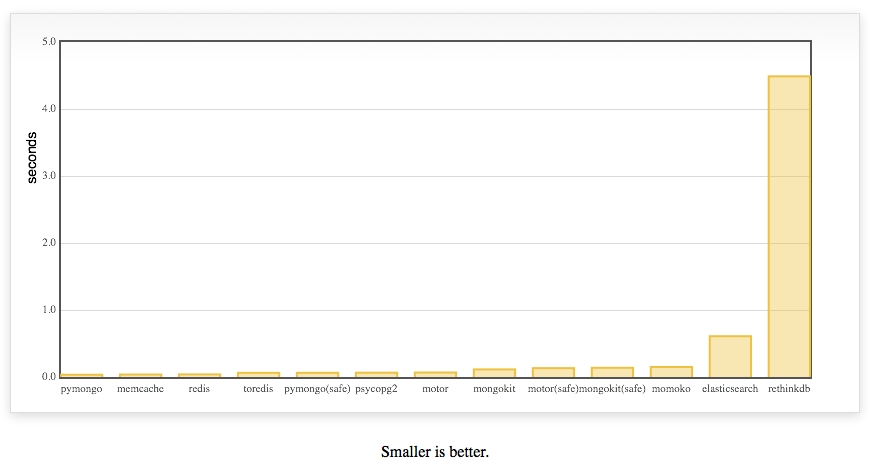
It was added in this commit and improved in this one.
I've been talking to the core team at RethinkDB to try to fix this.
How I stopped worrying about IO blocking Tornado
September 18, 2012
5 comments Tornado
So, the cool thing about Tornado the Python web framework is that it's based on a single thread IO loop. Aka Eventloop. This means that you can handle high concurrency with optimal performance. However, it means that can't do things that take a long time because then you're blocking all other users.
The solution to the blocking problem is to then switch to asynchronous callbacks which means a task can churn away in the background whilst your web server can crack on with other requests. That's great but it's actually not that easy. Writing callback code in Tornado is much more pleasant than say, Node, where you actually have to "fork" off in different functions with different scope. For example, here's what it might look like:
class MyHandler(tornado.web.RequestHandler):
    @asynchronous
    @gen.engine
    def get(self):
        http_client = AsyncHTTPClient()
        response = yield gen.Task(http_client.fetch, "http://example.com")
        stuff = do_something_with_response(response)
        self.render("template.html", **stuff)
It's pretty neat but it's still work. And sometimes you just don't know if something is going to be slow or not. If it's not going to be slow (e.g. fetching a simple value from a fast local database) you don't want to do it async anyway.
So on Around The World I have a whole Admin dashboard where I edit questions, upload photos and run various statistical reports which can be all very slow. Since the only user who is using the Admin is me, I don't care if it's not very fast. So, I don't have to worry about wrapping things like thumbnail pre-generation in asynchronous callback code. But I don't either want to block the rest of the app where every single request has to be fast. Here's how I solve that.
First, I start 4 different processors across 4 different ports:
127.0.0.1:10001
127.0.0.1:10002
127.0.0.1:10003
127.0.0.1:10004
Then, I decide that 127.0.0.1:10004 will be dedicated to slow blocking ops only used by the Admin dashboard.
In Nginx it's easy. Here's the config I used (simplified for clarity)
upstream aroundtheworld_backends {
    server 127.0.0.1:10001;
    server 127.0.0.1:10002;
    server 127.0.0.1:10003;
}

upstream aroundtheworld_admin_backends {
    server 127.0.0.1:10004;
}

server {
    server_name aroundtheworldgame.com;
    root /var/lib/tornado/aroundtheworld;
    ...

    try_files /maintenance.html @proxy;

    location /admin {
        proxy_pass http://aroundtheworld_admin_backends;
    }

    location @proxy {
        proxy_pass http://aroundtheworld_backends;
    }

    ...
}
With this in play it means that I can write slow blocking code without worry about blocking other users than myself.
This might sound lazy and that I should use an asynchronous library for all my DB, net and file system access but mind you that's not without its own risks and trouble. Most of the DB access is built to be very very simple queries that are always really light and almost always done over and database index that is fully in RAM. Doing it like this I can code away without much complexity and yet never have to worry about making the site slow.
UPDATE
I changed the Nginx config to use the try_files directive instead. Looks nicer.
Real-timify Django with SockJS
September 6, 2012
4 comments Django, JavaScript, Tornado
In yesterdays DjangoCon BDFL Keynote Adrian Holovaty called out that Django needs a Real-Time story. Well, here's a response to that: django-sockjs-tornado
Immediately after the keynote I went and found a comfortable chair and wrote this app. It's basically a django app that allows you to run a socketserver with manage.py like this:
python manage.py socketserver
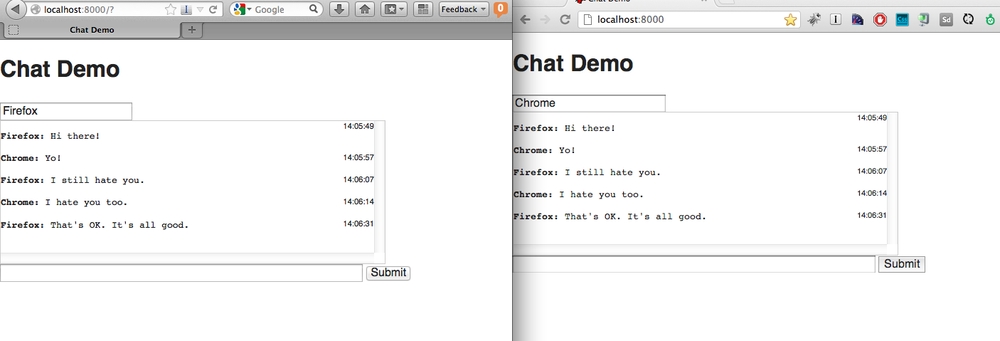
Now, you can use all of SockJS to write some really flashy socket apps. In Django! Using Django models and stuff. The example included shows how to write a really simple chat application using Django models. check out the whole demo here
If you're curious about SockJS read the README and here's one of many good threads about the difference between SockJS and socket.io.
The reason I could write this app so quickly was because I have already written a production app using sockjs-tornado so the concepts were familiar. However, this app has (at the time of writing) not been used in any production. So mind you it might still need some more love before you show your mom your django app with WebSockets.
Persistent caching with fire-and-forget updates
December 14, 2011
4 comments Python, Tornado
I just recently landed some patches on toocool that implements and interesting pattern that is seen more and more these days. I call it: Persistent caching with fire-and-forget updates
Basically, the implementation is this: You issue a request that requires information about a Twitter user: E.g. http://toocoolfor.me/following/chucknorris/vs/peterbe
The app looks into its MongoDB for information about the tweeter and if it can't find this user it goes onto the Twitter REST API and looks it up and saves the result in MongoDB.
The next time the same information is requested, and the data is available in the MongoDB it instead checks if the modify_date or more than an hour and if so, it sends a job to the message queue (Celery with Redis in my case) to perform an update on this tweeter.
You can basically see the code here but just to reiterate and abbreviate, it looks like this:
tweeter = self.db.Tweeter.find_one({'username': username})
if not tweeter:
   result = yield tornado.gen.Task(...)
   if result:
       tweeter = self.save_tweeter_user(result)
   else:
       # deal with the error!
elif age(tweeter['modify_date']) > 3600:
   tasks.refresh_user_info.delay(username, ...)
# render the template!
What the client gets, i.e. the user using the site, is it that apart from the very first time that URL is request is instant results but data is being maintained and refreshed.
This pattern works great for data that doesn't have to be up-to-date to the second but that still needs a way to cache invalidate and re-fetch. This works because my limit of 1 hour is quite arbitrary. An alternative implementation would be something like this:
tweeter = self.db.Tweeter.find_one({'username': username})
if not tweeter or (tweeter and age(tweeter) > 3600 * 24 * 7):
    # re-fetch from Twitter REST API
elif age(tweeter) > 3600:
    # fire-and-forget update
That way you don't suffer from persistently cached data that is too old.
Integrate BrowserID in a Tornado web app
November 22, 2011
2 comments Tornado, Mozilla
 BrowserID is a new single sign-on initiative lead by Mozilla that takes a very refreshing approach to single sign-on. It's basically like OpenID except better and similar to the OAuth solutions from Google, Twitter, Facebook, etc but without being tied to those closed third-parties.
At the moment, BrowserID is ready for production (I have it on Kwissle) but the getting started docs is still something that is under active development (I'm actually contributing to this).
Anyway, I thought I'd share how to integrate it with Tornado
First, you need to do the client-side of things. I use jQuery but that's not a requirement to be able to use BrowserID. Also, there are different "patterns" to do login. Either you have a header that either says "Sign in"/"Hi Your Username". Or you can have a dedicated page (e.g. mysite.com/login/). Let's, for simplicity sake, pretend we build a dedicated page to log in. First, add the necessary HTML:
<a href="#" id="browserid" title="Sign-in with BrowserID">
  <img src="/images/sign_in_blue.png" alt="Sign in">
</a>
<script src="https://browserid.org/include.js" async></script>
Next you need the Javascript in place so that clicking on the link above will open the BrowserID pop-up:
function loggedIn(response) {
  location.href = response.next_url;
  /* alternatively you could do something like this instead:
       $('#header .loggedin').show().text('Hi ' + response.first_name);
    ...or something like that */
}

function gotVerifiedEmail(assertion) {
 // got an assertion, now send it up to the server for verification
 if (assertion !== null) {
   $.ajax({
     type: 'POST',
     url: '/auth/login/browserid/',
     data: { assertion: assertion },
     success: function(res, status, xhr) {
       if (res === null) {}//loggedOut();
       else loggedIn(res);
     },
     error: function(res, status, xhr) {
       alert("login failure" + res);
     }
   });
 }
 else {
   //loggedOut();
 }
}

$(function() {
  $('#browserid').click(function() {
    navigator.id.getVerifiedEmail(gotVerifiedEmail);
    return false;
  });
});
Next up is the server-side part of BrowserID. Your job is to take the assertion that is given to you by the AJAX POST and trade that with https://browserid.org for an email address:
import urllib
import tornado.web
import tornado.escape
import tornado.httpclient
...

@route('/auth/login/browserid/')  # ...or whatever you use
class BrowserIDAuthLoginHandler(tornado.web.RequestHandler):

   def check_xsrf_cookie(self):  # more about this later
       pass

   @tornado.web.asynchronous
   def post(self):
       assertion = self.get_argument('assertion')
       http_client = tornado.httpclient.AsyncHTTPClient()
       domain = 'my.domain.com'  # MAKE SURE YOU CHANGE THIS
       url = 'https://browserid.org/verify'
       data = {
         'assertion': assertion,
         'audience': domain,
       }
       response = http_client.fetch(
         url,
         method='POST',
         body=urllib.urlencode(data),
         callback=self.async_callback(self._on_response)
       )

   def _on_response(self, response):
       struct = tornado.escape.json_decode(response.body)
       if struct['status'] != 'okay':
           raise tornado.web.HTTPError(400, "Failed assertion test")
       email = struct['email']
       self.set_secure_cookie('user', email,
                                  expires_days=1)
       self.set_header("Content-Type", "application/json; charset=UTF-8")
       response = {'next_url': '/'}
       self.write(tornado.escape.json_encode(response))
       self.finish()
Now that should get you up and running. There's of couse a tonne of things that can be improved. Number one thing to improve is to use XSRF on the AJAX POST. The simplest way to do that would be to somehow dump the XSRF token generated into your page and include it in the AJAX POST. Perhaps something like this:
<script>
var _xsrf = '{{ xsrf_token }}';
...
function gotVerifiedEmail(assertion) {
 // got an assertion, now send it up to the server for verification
 if (assertion !== null) {
    $.ajax({
     type: 'POST',
     url: '/auth/login/browserid/',
     data: { assertion: assertion, _xsrf: _xsrf },
...
</script>
Another thing that could obviously do with a re-write is the way users are handled server-side. In the example above I just set the asserted user's email address in a secure cookie. More realistically, you'll have a database of users who you match by email address but instead store their database ID in a cookie or something like that.
What's so neat about solutions such as OpenID, BrowserID, etc. is that you can combine two things in one process: Sign-in and Registration. In your app, all you need to do is a simple if statement in the code like this:
user = self.db.User.find_by_email(email)
if not user:
    user = self.db.User()
    user.email = email
    user.save()
self.set_secure_cookie('user', str(user.id))
Hopefully that'll encourage a couple of more Tornadonauts to give BrowserID a try.
Too Cool For Me?
September 25, 2011
0 comments Tornado
 Too Cool For Me? is a fun little side-project I've been working on. It's all about and only for Twitter. You login, then install a bookmarklet then when browsing twitter you can see who follows you and who is too cool for you.
For me it's a chance to try some new tech and at the same time scratch an itch I had. The results can be quite funny but also sad too when you realise that someone uncool isn't following you even though you follow him/her.
The code is open source and available on Github and at least it might help people see how to do a web app in Tornado using MongoDB and asynchronous requests to the Twitter API