Leibniz formula for π in Python, JavaScript, and Ruby
March 14, 2024
0 comments Python, JavaScript
Officially, I'm one day behind, but here's how you can calculate the value of π using the Leibniz formula.

Python
import math

sum = 0
estimate = 0
i = 0
epsilon = 0.0001
while abs(estimate - math.pi) > epsilon:
    sum += (-1) ** i / (2 * i + 1)
    estimate = sum * 4
    i += 1
print(
    f"After {i} iterations, the estimate is {estimate} and the real pi is {math.pi} "
    f"(difference of {abs(estimate - math.pi)})"
)
Outputs:
After 10000 iterations, the estimate is 3.1414926535900345 and the real pi is 3.141592653589793 (difference of 9.99999997586265e-05)
JavaScript
let sum = 0;
let estimate = 0;
let i = 0;
const epsilon = 0.0001;

while (Math.abs(estimate - Math.PI) > epsilon) {
  sum += (-1) ** i / (2 * i + 1);
  estimate = sum * 4;
  i += 1;
}
console.log(
  `After ${i} iterations, the estimate is ${estimate} and the real pi is ${Math.PI} ` +
    `(difference of ${Math.abs(estimate - Math.PI)})`
);
Outputs
After 10000 iterations, the estimate is 3.1414926535900345 and the real pi is 3.141592653589793 (difference of 0.0000999999997586265)
Ruby
sum = 0
estimate = 0
i = 0
epsilon = 0.0001
while (estimate - Math::PI).abs > epsilon
    sum += ((-1) ** i / (2.0 * i + 1))
    estimate = sum * 4
    i += 1
end
print(
    "After #{i} iterations, the estimate is #{estimate} and the real pi is #{Math::PI} "+
    "(difference of #{(estimate - Math::PI).abs})"
)
Outputs
After 10000 iterations, the estimate is 3.1414926535900345 and the real pi is 3.141592653589793 (difference of 9.99999997586265e-05)
Backwards
Technically, these little snippets are checking that it works since each language already has access to a value of π as a standard library constant.
If you don't have that, you can decide on a number of iterations, for example 1,000, and use that.
Python
sum = 0
for i in range(1000):
    sum += (-1) ** i / (2 * i + 1)
print(sum * 4)
JavaScript
let sum = 0;
for (const i of [...Array(10000).keys()]) {
  sum += (-1) ** i / (2 * i + 1);
}
console.log(sum * 4);
Ruby
sum = 0
for i in 0..10000
    sum += ((-1) ** i / (2.0 * i + 1))
end
puts sum * 4
Performance test
Perhaps a bit silly but also a fun thing to play with. Pull out hyperfine and compare Python 3.12, Node 20.11, Ruby 3.2, and Bun 1.0.30:
❯ hyperfine --warmup 10 "python3.12 ~/pi.py" "node ~/pi.js" "ruby ~/pi.rb" "bun run ~/pi.js"
Benchmark 1: python3.12 ~/pi.py
  Time (mean ± σ):      53.4 ms ±   7.5 ms    [User: 31.9 ms, System: 12.3 ms]
  Range (min … max):    41.5 ms …  64.8 ms    44 runs

Benchmark 2: node ~/pi.js
  Time (mean ± σ):      57.5 ms ±  10.6 ms    [User: 43.3 ms, System: 11.0 ms]
  Range (min … max):    46.2 ms …  82.6 ms    35 runs

Benchmark 3: ruby ~/pi.rb
  Time (mean ± σ):     242.1 ms ±  11.6 ms    [User: 68.4 ms, System: 37.2 ms]
  Range (min … max):   227.3 ms … 265.3 ms    11 runs

Benchmark 4: bun run ~/pi.js
  Time (mean ± σ):      32.9 ms ±   6.3 ms    [User: 14.1 ms, System: 10.0 ms]
  Range (min … max):    17.1 ms …  41.9 ms    60 runs

Summary
  bun run ~/pi.js ran
    1.62 ± 0.39 times faster than python3.12 ~/pi.py
    1.75 ± 0.46 times faster than node ~/pi.js
    7.35 ± 1.45 times faster than ruby ~/pi.rb
Comparing Pythons
Just because I have a couple of these installed:
❯ hyperfine --warmup 10 "python3.8 ~/pi.py" "python3.9 ~/pi.py" "python3.10 ~/pi.py" "python3.11 ~/pi.py" "python3.12 ~/pi.py"
Benchmark 1: python3.8 ~/pi.py
  Time (mean ± σ):      54.6 ms ±   8.1 ms    [User: 33.0 ms, System: 11.4 ms]
  Range (min … max):    40.0 ms …  69.7 ms    56 runs

Benchmark 2: python3.9 ~/pi.py
  Time (mean ± σ):      54.9 ms ±   8.0 ms    [User: 32.2 ms, System: 12.3 ms]
  Range (min … max):    42.3 ms …  70.1 ms    38 runs

Benchmark 3: python3.10 ~/pi.py
  Time (mean ± σ):      54.7 ms ±   7.5 ms    [User: 33.0 ms, System: 11.8 ms]
  Range (min … max):    42.3 ms …  78.1 ms    44 runs

Benchmark 4: python3.11 ~/pi.py
  Time (mean ± σ):      53.8 ms ±   6.0 ms    [User: 32.7 ms, System: 13.0 ms]
  Range (min … max):    44.8 ms …  70.3 ms    42 runs

Benchmark 5: python3.12 ~/pi.py
  Time (mean ± σ):      53.0 ms ±   6.4 ms    [User: 31.8 ms, System: 12.3 ms]
  Range (min … max):    43.8 ms …  63.5 ms    42 runs

Summary
  python3.12 ~/pi.py ran
    1.02 ± 0.17 times faster than python3.11 ~/pi.py
    1.03 ± 0.20 times faster than python3.8 ~/pi.py
    1.03 ± 0.19 times faster than python3.10 ~/pi.py
    1.04 ± 0.20 times faster than python3.9 ~/pi.py
Notes on porting a Next.js v14 app from Pages to App Router
March 2, 2024
0 comments React, JavaScript
Unfortunately, the app I ported from using the Pages Router to using App Router, is in a private repo. It's a Next.js static site SPA (Single Page App).
It's built with npm run build and then exported so that the out/ directory is the only thing I need to ship to the CDN and it just works. There's a home page and a few dynamic routes whose slugs depend on an SQL query. So the SQL (PostgreSQL) connection, using knex, has to be present when running npm run build.
In no particular order, let's look at some differences
Build times
With caching
After running next build a bunch of times, the rough averages are:
- Pages Router: 20.5 seconds
- App Router: 19.5 seconds
Without caching
After running rm -fr .next && next build a bunch of times, the rough averages are:
- Pages Router: 28.5 seconds
- App Router: 31 seconds
Note
I have another SPA app that is built with vite and wouter and uses the heavy mantine for the UI library. That SPA app does a LOT more in terms of components and pages etc. That one takes 9 seconds on average.
Static output
If you compare the generated out/_next/static/chunks there's a strange difference.
Pages Router
360.0 KiB [##########################] /pages
268.0 KiB [###################       ]  726-4194baf1eea221e4.js
160.0 KiB [###########               ]  ee8b1517-76391449d3636b6f.js
140.0 KiB [##########                ]  framework-5429a50ba5373c56.js
112.0 KiB [########                  ]  cdfd8999-a1782664caeaab31.js
108.0 KiB [########                  ]  main-930135e47dff83e9.js
 92.0 KiB [######                    ]  polyfills-c67a75d1b6f99dc8.js
 16.0 KiB [#                         ]  502-394e1f5415200700.js
  8.0 KiB [                          ]  0e226fb0-147f1e5268512885.js
  4.0 KiB [                          ]  webpack-1b159842bd89504c.js
In total 1.2 MiB across 15 files.
App Router
428.0 KiB [##########################]  142-94b03af3aa9e6d6b.js
196.0 KiB [############              ]  975-62bfdeceb3fe8dd8.js
184.0 KiB [###########               ]  25-aa44907f6a6c25aa.js
172.0 KiB [##########                ]  fd9d1056-e15083df91b81b75.js
164.0 KiB [##########                ]  ca377847-82e8fe2d92176afa.js
140.0 KiB [########                  ]  framework-aec844d2ccbe7592.js
116.0 KiB [#######                   ]  a6eb9415-a86923c16860379a.js
112.0 KiB [#######                   ]  69-f28d58313be296c0.js
108.0 KiB [######                    ]  main-67e49f9e34a5900f.js
 92.0 KiB [#####                     ]  polyfills-c67a75d1b6f99dc8.js
 44.0 KiB [##                        ] /app
 24.0 KiB [#                         ]  1cc5f7f4-2f067a078d041167.js
 24.0 KiB [#                         ]  250-47a2e67f72854c46.js
  8.0 KiB [                          ] /pages
  4.0 KiB [                          ]  webpack-baa830a732d3dbbf.js
  4.0 KiB [                          ]  main-app-f6b391c808310b44.js
In total 1.7 MiB across 27 files.
Notes
What makes the JS bundle large is most certainly due to using @primer/react, @fullcalendar, and react-chartjs-2.
But why is the difference so large?
Dev start time
The way Next.js works, with npm run dev, is that it starts a server at localhost:3000 and only when you request a URL does it compile something. It's essentially lazy and that's a good thing because in a bigger app, you might have too many different entries so it'd be silly to wait for all of them to compile if you might not use them all.
Pages Router
❯ npm run dev

...

 ✓ Ready in 1125ms
 ○ Compiling / ...
 ✓ Compiled / in 2.9s (495 modules)
App Router
❯ npm run dev

...

 ✓ Ready in 1201ms
 ○ Compiling / ...
 ✓ Compiled / in 3.7s (1023 modules)
Mind you, it almost always says "Ready in 1201ms" or but the other number, like "3.7s" in this example, that seems to fluctuate quite wildly. I don't know why.
Conclusion
Was it worth it? Yes and no.
I've never liked next/router. With App Router you instead use next/navigation which feels much more refined and simple. The old next/router is still there which exposes a useRouter hook which is still used for doing push and replace.
The getStaticPaths and the getStaticProps were not really that terrible in Pages Router.
I think the whole point of App Router is that you can get external data not only in getStaticProps (or getServerSideProps) but you can more freely go and get external data in places like layout.tsx, which means less prop-drilling.
There are some nicer APIs with App Router. And it's the future of Next.js and how Vercel is pushing it forward.
Comparing different efforts with WebP in Sharp
October 5, 2023
0 comments Node, JavaScript
When you, in a Node program, use sharp to convert an image buffer to a WebP buffer, you have an option of effort. The higher the number the longer it takes but the image it produces is smaller on disk.
I wanted to put some realistic numbers for this, so I wrote a benchmark, run on my Intel MacbookPro.
The benchmark
It looks like this:
async function e6() {
  return await f("screenshot-1000.png", 6);
}
async function e5() {
  return await f("screenshot-1000.png", 5);
}
async function e4() {
  return await f("screenshot-1000.png", 4);
}
async function e3() {
  return await f("screenshot-1000.png", 3);
}
async function e2() {
  return await f("screenshot-1000.png", 2);
}
async function e1() {
  return await f("screenshot-1000.png", 1);
}
async function e0() {
  return await f("screenshot-1000.png", 0);
}

async function f(fp, effort) {
  const originalBuffer = await fs.readFile(fp);
  const image = sharp(originalBuffer);
  const { width } = await image.metadata();
  const buffer = await image.webp({ effort }).toBuffer();
  return [buffer.length, width, { effort }];
}
Then, I ran each function in serial and measured how long it took. Then, do that whole thing 15 times. So, in total, each function is executed 15 times. The numbers are collected and the median (P50) is reported.
A 2000x2000 pixel PNG image
1. e0: 191ms                   235KB
2. e1: 340.5ms                 208KB
3. e2: 369ms                   198KB
4. e3: 485.5ms                 193KB
5. e4: 587ms                   177KB
6. e5: 695.5ms                 177KB
7. e6: 4811.5ms                142KB
What it means is that if you use {effort: 6} the conversion of a 2000x2000 PNG took 4.8 seconds but the resulting WebP buffer became 142KB instead of the least effort which made it 235 KB.
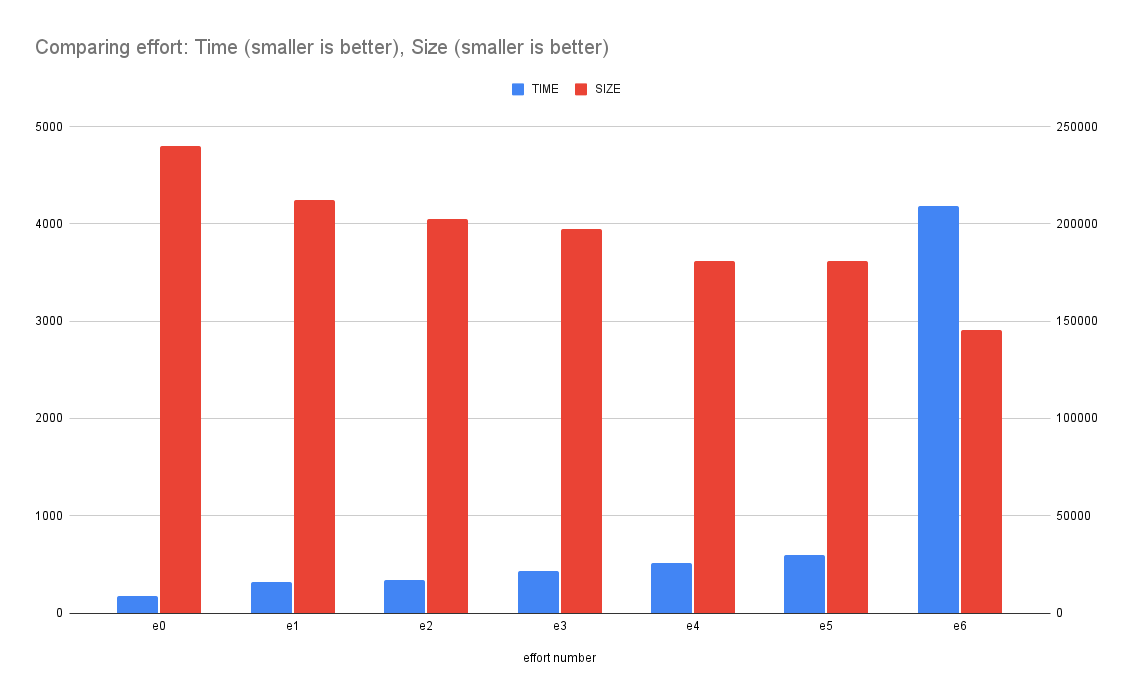
This graph demonstrates how the (blue) time goes up the more effort you put in. And how the final size (red) goes down the more effort you put in.
A 1000x1000 pixel PNG image
1. e0: 54ms                    70KB
2. e1: 60ms                    66KB
3. e2: 65ms                    61KB
4. e3: 96ms                    59KB
5. e4: 169ms                   53KB
6. e5: 193ms                   53KB
7. e6: 1466ms                  51KB
A 500x500 pixel PNG image
1. e0: 24ms                    23KB
2. e1: 26ms                    21KB
3. e2: 28ms                    20KB
4. e3: 37ms                    19KB
5. e4: 57ms                    18KB
6. e5: 66ms                    18KB
7. e6: 556ms                   18KB
Conclusion
Up to you but clearly, {effort: 6} is to be avoided if you're worried about it taking a huge amount of time to make the conversion.
Perhaps the takeaway is; that if you run these operations in the build step such that you don't have to ever do it again, it's worth the maximum effort. Beyond that, find a sweet spot for your particular environment and challenge.
Introducing hylite - a Node code-syntax-to-HTML highlighter written in Bun
October 3, 2023
0 comments Node, Bun, JavaScript
hylite is a command line tool for syntax highlight code into HTML. You feed it a file or some snippet of code (plus what language it is) and it returns a string of HTML.
Suppose you have:
❯ cat example.py
# This is example.py
def hello():
    return "world"
When you run this through hylite you get:
❯ npx hylite example.py
<span class="hljs-keyword">def</span> <span class="hljs-title function_">hello</span>():
<span class="hljs-keyword">return</span> <span class="hljs-string">"world"</span>
Now, if installed with the necessary CSS, it can finally render this:
# This is example.py
def hello():
    return "world"
(Note: At the time of writing this, npx hylite --list-css or npx hylite --css don't work unless you've git clone the github.com/peterbe/hylite repo)
How I use it
This originated because I loved how highlight.js works. It supports numerous languages, can even guess the language, is fast as heck, and the HTML output is compact.
Originally, my personal website, whose backend is in Python/Django, was using Pygments to do the syntax highlighting. The problem with that is it doesn't support JSX (or TSX). For example:
export function Bell({ color }: {color: string}) {
  return <div style={{ backgroundColor: color }}>Ding!</div>
}
The problem is that Python != Node so to call out to hylite I use a sub-process. At the moment, I can't use bunx or npx because that depends on $PATH and stuff that the server doesn't have. Here's how I call hylite from Python:
command = settings.HYLITE_COMMAND.split()
assert language
command.extend(["--language", language, "--wrapped"])
process = subprocess.Popen(
    command,
    stdin=subprocess.PIPE,
    stdout=subprocess.PIPE,
    stderr=subprocess.PIPE,
    text=True,
    cwd=settings.HYLITE_DIRECTORY,
)
process.stdin.write(code)
output, error = process.communicate()
The settings are:
HYLITE_DIRECTORY = "/home/django/hylite"
HYLITE_COMMAND = "node dist/index.js"
How I built hylite
What's different about hylite compared to other JavaScript packages and CLIs like this is that the development requires Bun. It's lovely because it has a built-in test runner, TypeScript transpiler, and it's just so lovely fast at starting for anything you do with it.
In my current view, I see Bun as an equivalent of TypeScript. It's convenient when developing but once stripped away it's just good old JavaScript and you don't have to worry about compatibility.
So I use bun for manual testing like bun run src/index.ts < foo.go but when it comes time to ship, I run bun run build (which executes, with bun, the src/build.ts) which then builds a dist/index.js file which you can run with either node or bun anywhere.
By the way, the README as a section on Benchmarking. It concludes two things:
node dist/index.jshas the same performance asbun run dist/index.jsbunx hyliteis 7x times faster thannpx hylitebut it's bullcrap becausebunxdoesn't check the network if there's a new version (...until you restart your computer)
Shallow clone vs. deep clone, in Node, with benchmark
September 29, 2023
0 comments Node, JavaScript
A very common way to create a "copy" of an Object in JavaScript is to copy all things from one object into an empty one. Example:
const original = {foo: "Foo"}
const copy = Object.assign({}, original)
copy.foo = "Bar"
console.log([original.foo, copy.foo])
This outputs
[ 'Foo', 'Bar' ]
Obviously the problem with this is that it's a shallow copy, best demonstrated with an example:
const original = { names: ["Peter"] }
const copy = Object.assign({}, original)
copy.names.push("Tucker")
console.log([original.names, copy.names])
This outputs:
[ [ 'Peter', 'Tucker' ], [ 'Peter', 'Tucker' ] ]
which is arguably counter-intuitive. Especially since the variable was named "copy".
Generally, I think Object.assign({}, someThing) is often a red flag because if not today, maybe in some future the thing you're copying might have mutables within.
The "solution" is to use structuredClone which has been available since Node 16. Actually, it was introduced within minor releases of Node 16, so be a little bit careful if you're still on Node 16.
Same example:
const original = { names: ["Peter"] };
// const copy = Object.assign({}, original);
const copy = structuredClone(original);
copy.names.push("Tucker");
console.log([original.names, copy.names]);
This outputs:
[ [ 'Peter' ], [ 'Peter', 'Tucker' ] ]
Another deep copy solution is to turn the object into a string, using JSON.stringify and turn it back into a (deeply copied) object using JSON.parse. It works like structuredClone but full of caveats such as unpredictable precision loss on floating point numbers, and not to mention date objects ceasing to be date objects but instead becoming strings.
Benchmark
Given how much "better" structuredClone is in that it's more intuitive and therefore less dangerous for sneaky nested mutation bugs. Is it fast? Before even running a benchmark; no, structuredClone is slower than Object.assign({}, ...) because of course. It does more! Perhaps the question should be: how much slower is structuredClone? Here's my benchmark code:
import fs from "fs"
import assert from "assert"

import Benchmark from "benchmark"

const obj = JSON.parse(fs.readFileSync("package-lock.json", "utf8"))

function f1() {
  const copy = Object.assign({}, obj)
  copy.name = "else"
  assert(copy.name !== obj.name)
}

function f2() {
  const copy = structuredClone(obj)
  copy.name = "else"
  assert(copy.name !== obj.name)
}

function f3() {
  const copy = JSON.parse(JSON.stringify(obj))
  copy.name = "else"
  assert(copy.name !== obj.name)
}

new Benchmark.Suite()
  .add("f1", f1)
  .add("f2", f2)
  .add("f3", f3)
  .on("cycle", (event) => {
    console.log(String(event.target))
  })
  .on("complete", function () {
    console.log("Fastest is " + this.filter("fastest").map("name"))
  })
  .run()
The results:
❯ node assign-or-clone.js
f1 x 8,057,542 ops/sec ±0.84% (93 runs sampled)
f2 x 37,245 ops/sec ±0.68% (94 runs sampled)
f3 x 37,978 ops/sec ±0.85% (92 runs sampled)
Fastest is f1
In other words, Object.assign({}, ...) is 200 times faster than structuredClone.
By the way, I re-ran the benchmark with a much smaller object (using the package.json instead of the package-lock.json) and then Object.assign({}, ...) is only 20 times faster.
Mind you! They're both ridiculously fast in the grand scheme of things.
If you do this...
for (let i = 0; i < 10; i++) {
  console.time("f1")
  f1()
  console.timeEnd("f1")

  console.time("f2")
  f2()
  console.timeEnd("f2")

  console.time("f3")
  f3()
  console.timeEnd("f3")
}
the last bit of output of that is:
f1: 0.006ms
f2: 0.06ms
f3: 0.053ms
which means that it took 0.06 milliseconds for structuredClone to make a convenient deep copy of an object that is 5KB as a JSON string.
Conclusion
Yes Object.assign({}, ...) is ridiculously faster than structuredClone but structuredClone is a better choice.
Hello-world server in Bun vs Fastify
September 9, 2023
4 comments Node, JavaScript, Bun
Bun 1.0 just launched and I'm genuinely impressed and intrigued. How long can this madness keep going? I've never built anything substantial with Bun. Just various scripts to get a feel for it.
At work, I recently launched a micro-service that uses Node + Fastify + TypeScript. I'm not going to rewrite it in Bun, but I'm going to get a feel for the difference.
Basic version in Bun
No need for a package.json at this point. And that's neat. Create a src/index.ts and put this in:
const PORT = parseInt(process.env.PORT || "3000");

Bun.serve({
  port: PORT,
  fetch(req) {
    const url = new URL(req.url);
    if (url.pathname === "/") return new Response(`Home page!`);
    if (url.pathname === "/json") return Response.json({ hello: "world" });
    return new Response(`404!`);
  },
});
console.log(`Listening on port ${PORT}`);
What's so cool about the convenience-oriented developer experience of Bun is that it comes with a native way for restarting the server as you're editing the server code:
❯ bun --hot src/index.ts
Listening on port 3000
Let's test it:
❯ xh http://localhost:3000/
HTTP/1.1 200 OK
Content-Length: 10
Content-Type: text/plain;charset=utf-8
Date: Sat, 09 Sep 2023 02:34:29 GMT

Home page!

❯ xh http://localhost:3000/json
HTTP/1.1 200 OK
Content-Length: 17
Content-Type: application/json;charset=utf-8
Date: Sat, 09 Sep 2023 02:34:35 GMT

{
    "hello": "world"
}
Basic version with Node + Fastify + TypeScript
First of all, you'll need to create a package.json to install the dependencies, all of which, at this gentle point are built into Bun:
❯ npm i -D ts-node typescript @types/node nodemon
❯ npm i fastify
And edit the package.json with some scripts:
  "scripts": {
    "dev": "nodemon src/index.ts",
    "start": "ts-node src/index.ts"
  },
And of course, the code itself (src/index.ts):
import fastify from "fastify";

const PORT = parseInt(process.env.PORT || "3000");

const server = fastify();

server.get("/", async () => {
  return "Home page!";
});

server.get("/json", (request, reply) => {
  reply.send({ hello: "world" });
});

server.listen({ port: PORT }, (err, address) => {
  if (err) {
    console.error(err);
    process.exit(1);
  }
  console.log(`Server listening at ${address}`);
});
Now run it:
❯ npm run dev

> fastify-hello-world@1.0.0 dev
> nodemon src/index.ts

[nodemon] 3.0.1
[nodemon] to restart at any time, enter `rs`
[nodemon] watching path(s): *.*
[nodemon] watching extensions: ts,json
[nodemon] starting `ts-node src/index.ts`
Server listening at http://[::1]:3000
Let's test it:
❯ xh http://localhost:3000/
HTTP/1.1 200 OK
Connection: keep-alive
Content-Length: 10
Content-Type: text/plain; charset=utf-8
Date: Sat, 09 Sep 2023 02:42:46 GMT
Keep-Alive: timeout=72

Home page!

❯ xh http://localhost:3000/json
HTTP/1.1 200 OK
Connection: keep-alive
Content-Length: 17
Content-Type: application/json; charset=utf-8
Date: Sat, 09 Sep 2023 02:43:08 GMT
Keep-Alive: timeout=72

{
    "hello": "world"
}
For the record, I quite like this little setup. nodemon can automatically understand TypeScript. It's a neat minimum if Node is a desire.
Quick benchmark
Bun
Note that this server has no logging or any I/O.
❯ bun src/index.ts
Listening on port 3000
Using hey to test 10,000 requests across 100 concurrent clients:
❯ hey -n 10000 -c 100 http://localhost:3000/

Summary:
  Total:    0.2746 secs
  Slowest:  0.0167 secs
  Fastest:  0.0002 secs
  Average:  0.0026 secs
  Requests/sec: 36418.8132

  Total data:   100000 bytes
  Size/request: 10 bytes
Node + Fastify
❯ npm run start
Using hey again:
❯ hey -n 10000 -c 100 http://localhost:3000/

Summary:
  Total:    0.6606 secs
  Slowest:  0.0483 secs
  Fastest:  0.0001 secs
  Average:  0.0065 secs
  Requests/sec: 15138.5719

  Total data:   100000 bytes
  Size/request: 10 bytes
About a 2x advantage to Bun.
Serving an HTML file with Bun
Bun.serve({
  port: PORT,
  fetch(req) {
    const url = new URL(req.url);
    if (url.pathname === "/") return new Response(`Home page!`);
    if (url.pathname === "/json") return Response.json({ hello: "world" });
+   if (url.pathname === "/index.html")
+     return new Response(Bun.file("src/index.html"));
    return new Response(`404!`);
  },
});
Serves the src/index.html file just right:
❯ xh --headers http://localhost:3000/index.html
HTTP/1.1 200 OK
Content-Length: 889
Content-Type: text/html;charset=utf-8
Serving an HTML file with Node + Fastify
First, install the plugin:
❯ npm i @fastify/static
And make this change:
+import path from "node:path";
+
 import fastify from "fastify";
+import fastifyStatic from "@fastify/static";

 const PORT = parseInt(process.env.PORT || "3000");

 const server = fastify();

+server.register(fastifyStatic, {
+  root: path.resolve("src"),
+});
+
 server.get("/", async () => {
   return "Home page!";
 });
 server.get("/json", (request, reply) => {
   reply.send({ hello: "world" });
 });

+server.get("/index.html", (request, reply) => {
+  reply.sendFile("index.html");
+});
+
 server.listen({ port: PORT }, (err, address) => {
   if (err) {
     console.error(err);
And it works great:
❯ xh --headers http://localhost:3000/index.html
HTTP/1.1 200 OK
Accept-Ranges: bytes
Cache-Control: public, max-age=0
Connection: keep-alive
Content-Length: 889
Content-Type: text/html; charset=UTF-8
Date: Sat, 09 Sep 2023 03:04:15 GMT
Etag: W/"379-18a77e4e346"
Keep-Alive: timeout=72
Last-Modified: Sat, 09 Sep 2023 03:03:23 GMT
Quick benchmark of serving the HTML file
Bun
❯ hey -n 10000 -c 100 http://localhost:3000/index.html

Summary:
  Total:    0.6408 secs
  Slowest:  0.0160 secs
  Fastest:  0.0001 secs
  Average:  0.0063 secs
  Requests/sec: 15605.9735

  Total data:   8890000 bytes
  Size/request: 889 bytes
Node + Fastify
❯ hey -n 10000 -c 100 http://localhost:3000/index.html

Summary:
  Total:    1.5473 secs
  Slowest:  0.0272 secs
  Fastest:  0.0078 secs
  Average:  0.0154 secs
  Requests/sec: 6462.9597

  Total data:   8890000 bytes
  Size/request: 889 bytes
Again, a 2x performance win for Bun.
Conclusion
There isn't much to conclude here. Just an intro to the beauty of how quick Bun is, both in terms of developer experience and raw performance.
What I admire about Bun being such a convenient bundle is that Python'esque feeling of simplicity and minimalism. (For example python3.11 -m http.server -d src 3000 will make http://localhost:3000/index.html work)
The basic boilerplate of Node with Fastify + TypeScript + nodemon + ts-node is a great one if you're not ready to make the leap to Bun. I would certainly use it again. Fastify might not be the fastest server in the Node ecosystem, but it's good enough.
What's not shown in this little intro blog post, and is perhaps a silly thing to focus on, is the speed with which you type bun --hot src/index.ts and the server is ready to go. It's as far as human perception goes instant. The npm run dev on the other hand has this ~3 second "lag". Not everyone cares about that, but I do. It's more of an ethos. It's that wonderful feeling that you don't pause your thinking.

It's hard to see when I press the Enter key but compare that to Bun:

UPDATE (Sep 11, 2023)
I found this: github.com/SaltyAom/bun-http-framework-benchmark
It's a much better benchmark than mine here. Mind you, as long as you're not using something horribly slow, and you're not doing any I/O the HTTP framework performances don't matter much.